
How to remove Amazon ads on Ubuntu
Last updated on October 30, 2013 by Dan Nanni
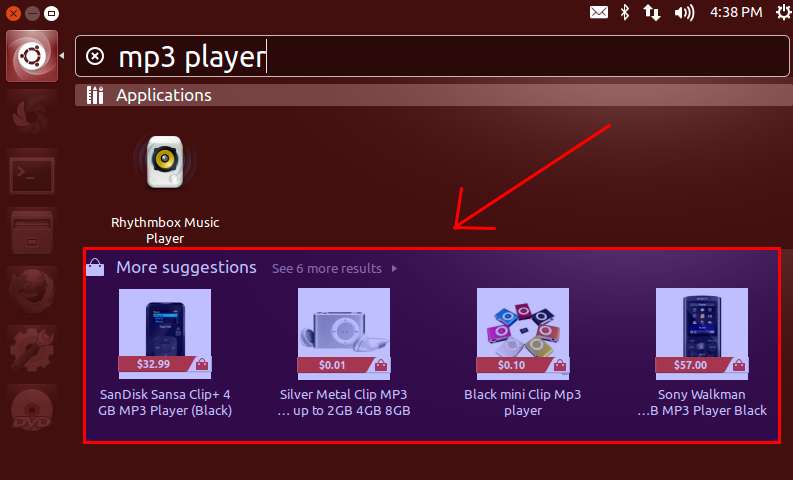
Since Ubuntu 12.10 (Quantal Quetzal), Unity Dash started to show shopping suggestions from Amazon as well as online search results, which are tailored to your searches. This feature ticks off many Ubuntu users.
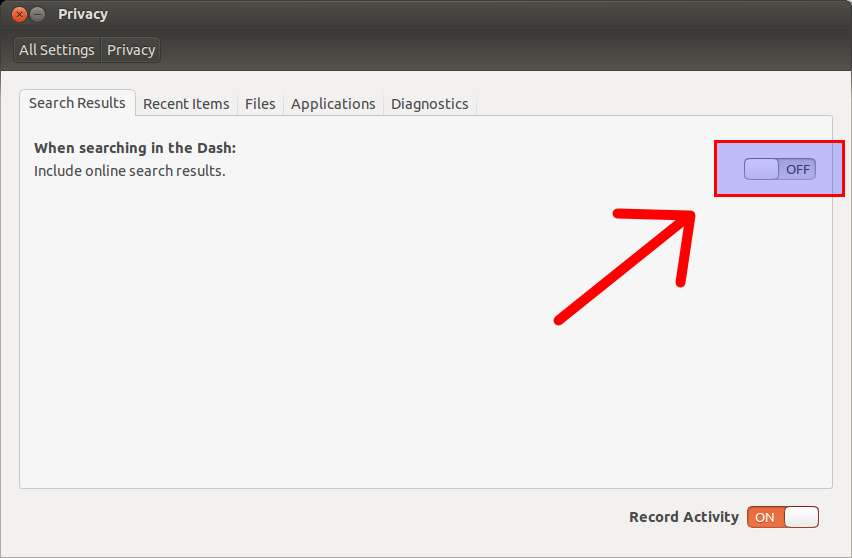
If you want to disable Amazon search results on Ubuntu Dash, go to "System Settings" → Privacy (or "Security & Privacy"). Then turn off "Include online search results" under Search tab. This will also disable showing other online search results on Ubuntu Dash.
Another way to remove Amazon shopping suggestions from Ubuntu Dash is to remove "Unity Shopping Lens" as follows. This works for Ubuntu 12.10, Ubuntu 13.04.
$ sudo apt-get remove unity-lens-shopping
After removal, you need to log out, and log back in to finalize deactivation.
Support Xmodulo
This website is made possible by minimal ads and your gracious donation via PayPal or credit card
Please note that this article is published by Xmodulo.com under a Creative Commons Attribution-ShareAlike 3.0 Unported License. If you would like to use the whole or any part of this article, you need to cite this web page at Xmodulo.com as the original source.

Xmodulo © 2021 ‒ About ‒ Write for Us ‒ Feed ‒ Powered by DigitalOcean